Debugging React bugs with AI: why your agent guesses, and how to make it stop
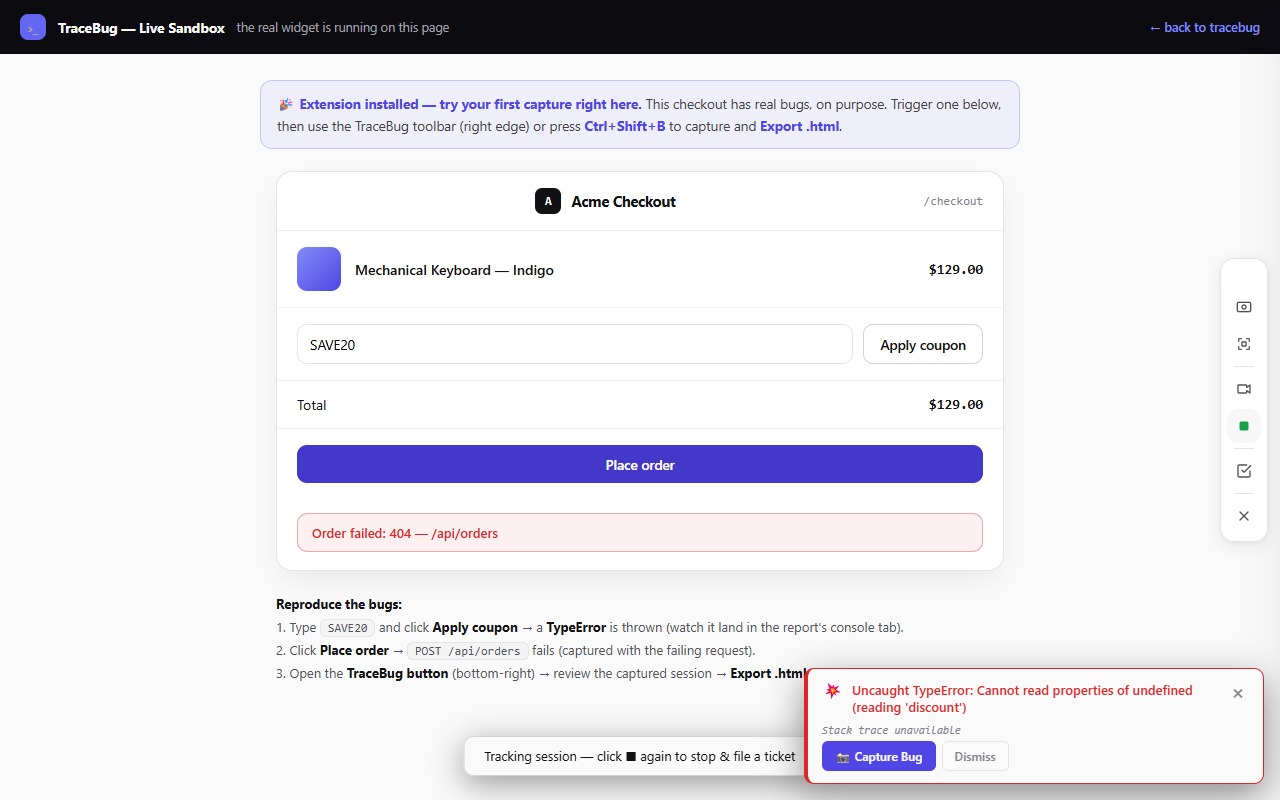
Ask an AI agent to fix a React bug from a one-line description and you'll usually get a very confident rewrite of the wrong thing. Not because the model is bad at React — it's arguably better-read in React than any of us — but because React's most common bugs are *runtime* bugs, and the agent only sees your *code*.
The gap between "what the code says" and "what actually happened at runtime" is precisely where React bugs live. Here are the four classes that dominate real apps, and what each one needs as evidence before an agent can fix it rather than guess at it.
1. The undefined-property TypeError
*"Cannot read properties of undefined (reading 'status')"* — the most common React crash in existence. The code renders order.status; somewhere upstream, order arrived undefined.
What the agent needs: the stack (which component, which line) *plus the network story*. Nine times out of ten the undefined traces back to an API response that wasn't what the code expected — an error object instead of data, an empty 200, a 404 the fetch never checked. Without the network evidence, the agent's fix is a defensive ?. that hides the bug. With it, the agent fixes the *cause*: the failed request and the missing error path.
2. State that doesn't update (or updates one render late)
The classic stale-closure family: a click handler reads old state, a callback captures a variable from three renders ago, a list doesn't re-render after a mutation because the reference didn't change.
What the agent needs: the *exact action sequence with timing*. "Clicked Add, then immediately clicked Save, and the count showed the old value" is diagnosable — the agent can trace which closure captured what and when. "The count is sometimes wrong" is not. This is where a captured click-by-click timeline beats any prose description a human will realistically write.
3. Effects firing at the wrong time
Double-fetches from an effect, a subscription that outlives its component, an infinite render loop from an unstable dependency. The code *looks* right; the sequence of executions is wrong.
What the agent needs: the console and network in *chronological order* interleaved with user actions. Two identical fetches four milliseconds apart tell an agent "unstable dependency or missing cleanup" instantly. The order of events IS the evidence — which is why a screenshot, which flattens time, rarely helps with this class.
4. "It renders wrong" (hydration mismatches, conditional-render gaps)
The state was fine, the data was fine, and the DOM is still wrong: a hydration warning, a component that vanished, a modal that rendered behind the page.
What the agent needs: the actual DOM at the failure moment — not the JSX, which describes intent, but what React actually committed. A DOM replay lets the agent inspect the real element tree, classes, and inline styles at the exact broken frame.
Capturing all four evidence types at once
You could gather each of these by hand per bug class — or capture everything, every time. That's the approach TraceBug takes (disclosure: I build it): a browser extension that records the DOM replay, console, network, and action timeline together, packaged as one local .html file your agent reads over a local MCP server. It works with any framework — React, Next.js, Vue, Svelte, plain HTML — because it captures at the browser level, not through React internals.
The React-specific payoff is that the four bug classes above stop needing different workflows. Undefined prop? The failing request is in the report. Stale state? The action timeline is in the report. Effect storm? The chronological console/network feed is in the report. Wrong render? The DOM replay is in the report. Capture once; the evidence for whichever class it turns out to be is already there — plus a generated failing Playwright test so the agent can prove the fix.
The live sandbox has an intentional TypeError of exactly the class-1 variety waiting for you. Capture it, hand it to Claude Code or Cursor, and watch the difference evidence makes.